New-build sales launch: the playbook
From the first plan to handing over the keys: what to arrange when as you put a new-build project on sale. With a checklist per phase and a sample schedule.
Sample schedule
Every project is different. This schedule shows the order things usually happen in; shift the weeks to fit your project.
- 3 to 6 months before the sales launch: project website with registration form live, images commissioned, interest being collected.
- 6 weeks before: price list, floor plans and brochure ready; interested people kept informed.
- Sales launch: registration open, with a clear closing date.
- 1 to 2 weeks after closing: allocate plot numbers (bouwnummers), call buyers, schedule meetings.
- After that: sign purchase agreements until enough has been sold to start building.
- During construction: extras and omissions, keeping buyers informed, completion.
1. Before the sale: make sure people see your project
Start as soon as the project is announced. Everyone who registers early is someone you can keep up to date until the sales launch.
- A project website with a registration form, on its own domain.
- Images that show what it will be like: exterior and interior artist impressions, and mood floor plans.
- Ask about preferences in the form already: house type, budget, ties to the region. You will need this later for the allocation.
- Know where your registrants come from, so you know which advert works.
2. Let buyers find their own home
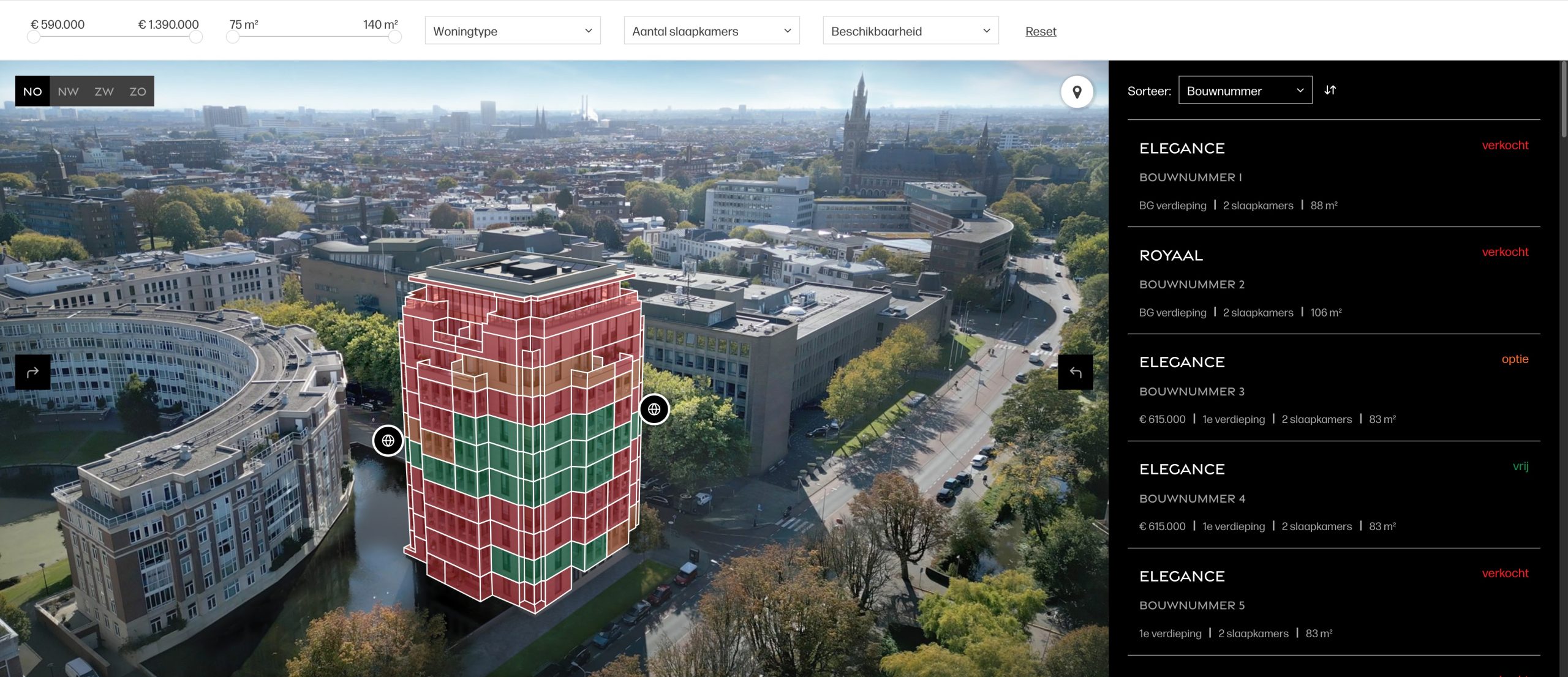
Every buyer’s first question is: which home suits me, and is it still available? A home finder answers it on the project website, with a clickable map or 3D view and filters for price, floor area and rooms. Availability syncs with your CRM, so a sold home immediately shows as sold.
3. Registration: one list, no loose emails
At the sales launch, everything comes in at once. Keep it in one overview per project, not in a mailbox or Excel.
- A fixed closing date, communicated in advance.
- For each registrant, their preferences, status and any priority.
- An automatic confirmation, so nobody wonders whether their registration has arrived.
- If you work in phases, separate plot numbers, prices and forms for each phase.
In Woonmodule Suite, registrations from the form and preferences from the home finder come together with the right person.
4. Allocation or ballot: fair and explainable
After closing, you have to decide who gets which plot number. Set out in advance how: by preference, by preference with priority (for example for people from the region), or by ballot. Then you can explain every choice to those who do not get a home. Since 2024, municipalities may set their own priority rules for affordable new-build homes for sale; so check the local housing bylaw (huisvestingsverordening) first.
- Set the rules before registration opens.
- If you hold a ballot, do it per home or house type, using the candidates’ preferences, possibly supervised by a civil-law notary (notaris).
- Keep a second and third candidate on hand for each plot number: someone often drops out.
- Call the candidates quickly; anyone who has to wait long keeps looking elsewhere.
After the registration period, Suite makes a proposal per plot number, with the score and the reason, or holds the ballot. If someone withdraws, you choose the next candidate.
5. From option to signature
The sooner the purchase agreement is signed, the sooner you know where you stand. Many projects may only start building once a large share of the homes has been sold, typically around 70%; so keep an eye on that counter every day.
- Fill in agreements automatically from the buyer details, including for a second buyer.
- Have them signed digitally, in the order you choose. A private buyer must sign in writing; use a proper electronic signature, because agreement via WhatsApp is not enough.
- After signing, a private buyer has a three-day cooling-off period. Only count a home as sold once it has passed.
- See which homes are not selling and adjust price, phasing or explanation.
Suite fills in your own Word template per buyer and plot number and has it signed through Signhost. The sales dashboard shows per house type what is selling and what is lagging behind.
6. Extras and omissions
Around the purchase, buyers want to make their home their own with extras and omissions (meer- en minderwerk): everything that departs from the standard building plan. Buyers are advised to request the option list before signing, so make sure it is available by then. A PDF or Excel option list costs the buyer advisor a lot of explaining. With a home configurator, buyers choose for themselves, see the price of every choice and can only choose combinations the contractor can build. More on this in the guide extras and omissions in new-build.
7. Until completion: keep buyers informed
Between signing and getting the keys there are often months or years. Buyers who hear nothing start calling.
- Send construction news at fixed moments, only to the people it concerns.
- Give buyers one place for their contracts, documents and choices.
- Let the data flow through to buyer support and the home file, without retyping.
With the mailing tool and the buyer portal in Suite, and through the integrations with HOOMCTRL and Volgjewoning.
Sales launch checklist
- Project website with registration form live
- Artist impressions and floor plans ready
- Price list and brochure per house type
- Rules for allocation or ballot set and published
- Registration closing date announced
- Confirmation email and post-allocation email ready
- Purchase agreement template ready
- Contractor’s option list for extras and omissions received
- Clear who calls buyers, and when
Frequently asked questions
When do you start selling new-build homes?
Sales usually start once prices, floor plans and the purchase agreement are ready. You can collect interest much earlier: put a project website with a registration form live as soon as the project is announced.
How do you allocate new-build homes fairly?
Set out in advance how you will allocate: by preference, by preference with priority, or by ballot. Publish those rules and keep reserve candidates for each plot number. Then you can explain every choice.
What do you need to sell a new-build project online?
A project website with a registration form, images of the homes, a home finder with up-to-date availability, one overview of all registrations, a way to allocate, and digital signing. Woonmodule supplies these separately or together in Woonmodule Suite.
Can I do this with my own CRM?
Yes. The home finder and configurator integrate with Realworks, NieuwbouwOffice, Hartje Wonen, HubSpot and Salesforce, among others. Woonmodule Suite also works on its own.
Prepare your sales launch together?
We would be happy to show you how it works, with a project similar to yours.